Finally, Fresh Apple's Bold Revamp of OS 26 Delivers the Refresh We All Needed
Apple just wrapped up its Worldwide Developers Conference (WWDC) 2025 Keynote Speech, and wow, they’ve got some exciting stuff in store!
The standout star? "Liquid Glass" – a sleek new design that’s about to give iOS 26, iPadOS 26, and macOS Tahoe a fresh, eye-catching look.
But it doesn’t stop there! Apple is also boosting Apple Intelligence to make your interactions smarter and more personalised than ever.
And let’s not forget, Apple TV+ continues to shine as the top spot for quality shows, keeping the pressure on to deliver amazing experiences.
Join us as we dive into all the cool announcements from WWDC 2025 and see how these innovations will shake things up for both developers and users. 👨🏿💻
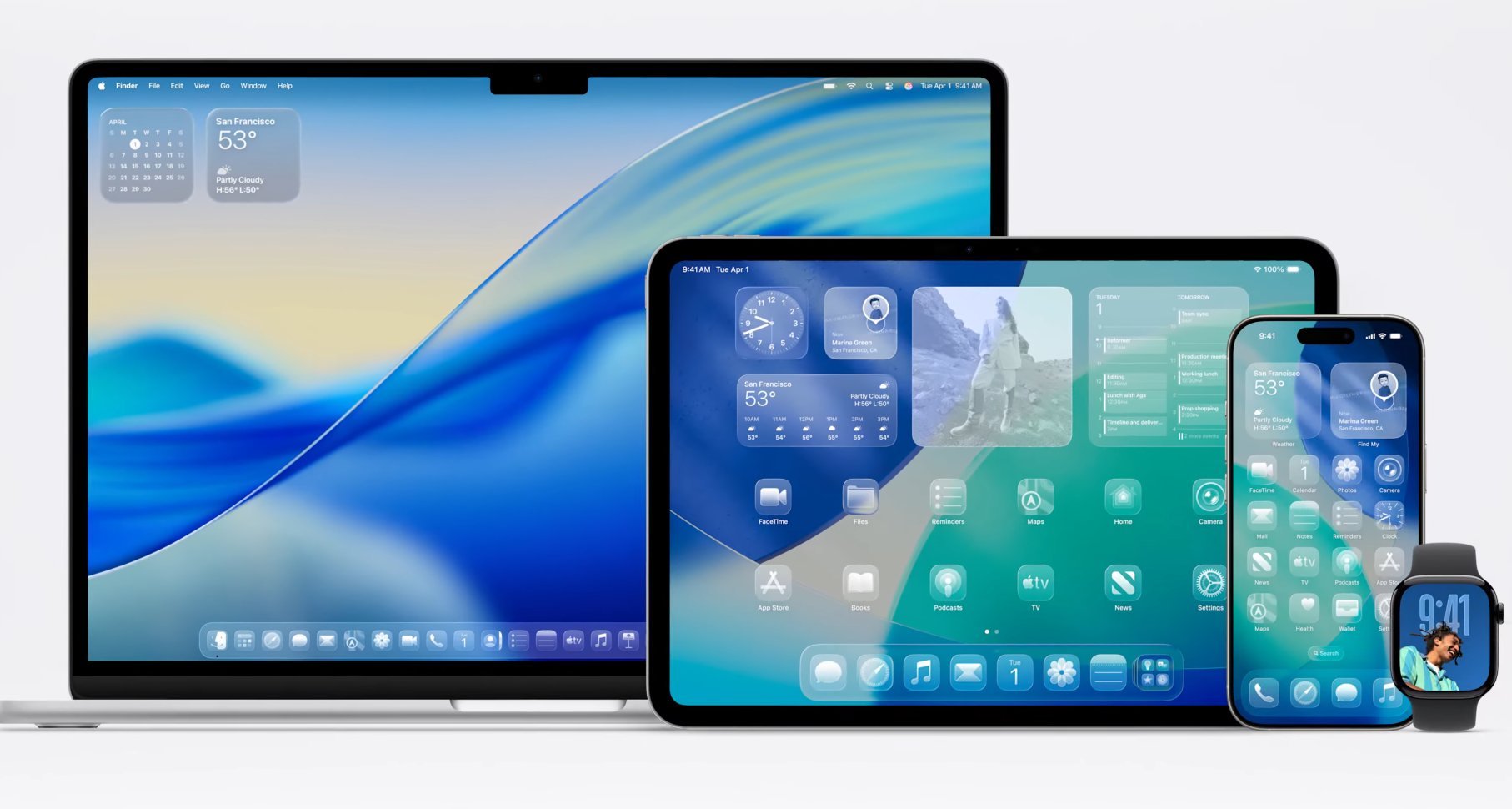
What do you think about the stunning Liquid Glass finish? Isn’t it captivating?
I have long said,
“I use an iPhone/Mac not because the hardware is great; there is better hardware out there. I use it because the software is GREAT.”

Software is the heart and soul of Apple products. It brings them to life, shapes their personality, and defines their purpose.
The deep integration of hardware and software is what brings it all together - This relationship enhances functionality, making interactions intuitive and visually appealing.
The software not only powers the devices but also defines their character and purpose, and a joy to use.
In the rapidly evolving landscape of user interfaces, creating a seamless and visually engaging experience that resonates with users can be a challenge. Many digital products struggle to balance aesthetics with functionality, resulting in interfaces that feel either too rigid or overly simplistic.
Apple introduced Liquid Glass (9 June 2025) as a comprehensive design philosophy that transforms the user interface experience.
This innovative design features semitransparent, glass-inspired aesthetics, incorporating shiny, reflective, and translucent elements.
Apple Silicon powers Liquid Glass, enabling layered transparency effects that closely mimic the depth and spatial interaction found in real glass. The design not only captivates the eye but also actively reacts to user input, offering a dynamic and tactile experience.
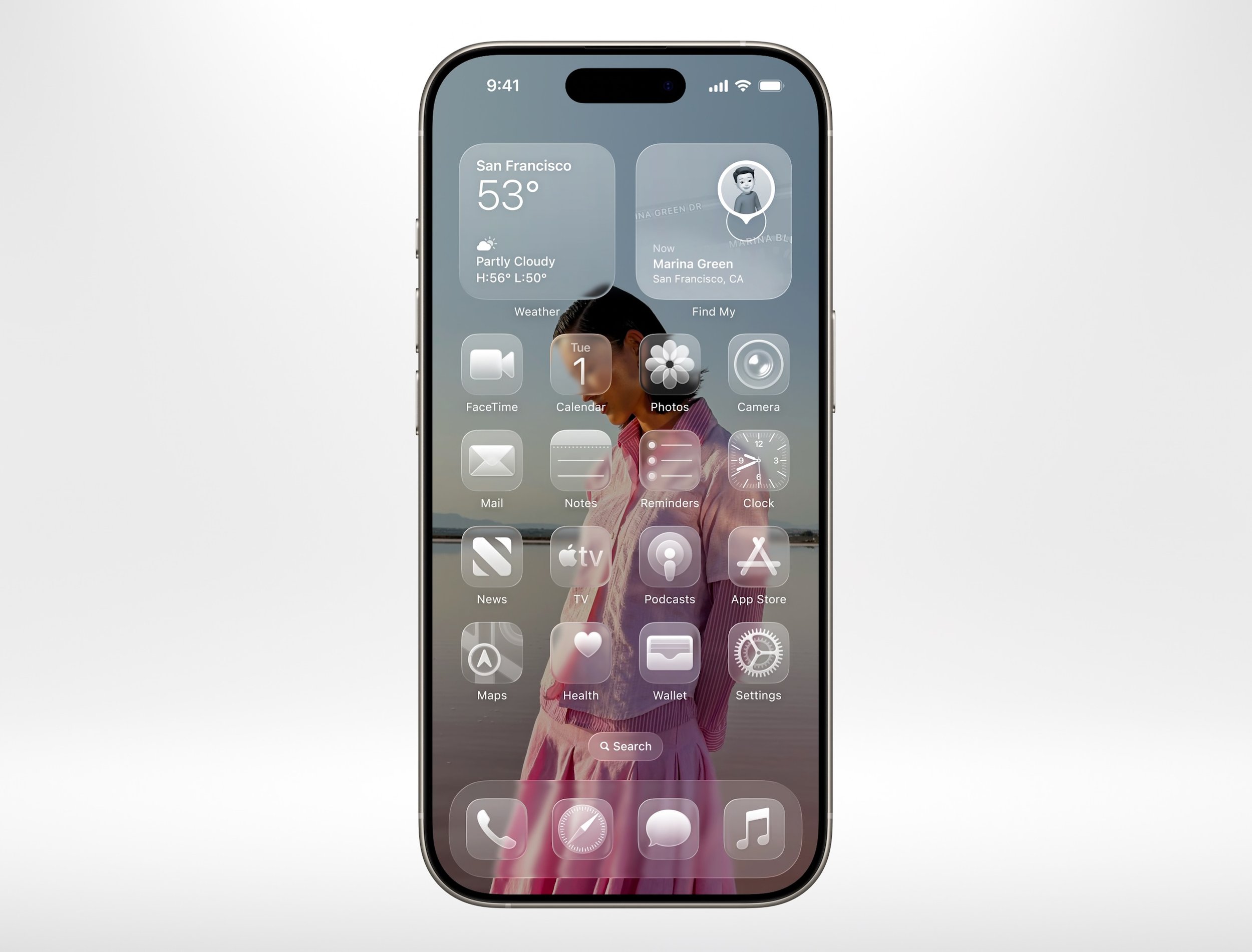
The implementation of Liquid Glass across all Apple devices—iPhones, iPads, MacBooks, Apple Watches, and Vision Pro headsets—has led to a unified design language that enhances user interaction.
Users will now enjoy a harmonious experience as they transition between devices while preserving the unique qualities of each product.
The engaging and responsive nature of Liquid Glass ensures that it feels both natural and alive, making it effortless to use and visually stunning. Overall, Liquid Glass has successfully elevated the Apple user experience, merging beauty with functionality in a way that feels intuitive and immersive.
I would go on to say it will lower the learning curve. If you are good on one device, you can function or easily onboard yourself to the other, upselling will be uber-easy for Apple Stores too 😉
UPDATES and IMPROVEMENTS
WWDC 2025 brought a wave of platform-specific innovations, each designed to leverage the unique capabilities of Apple's various operating systems.
macOS Tahoe
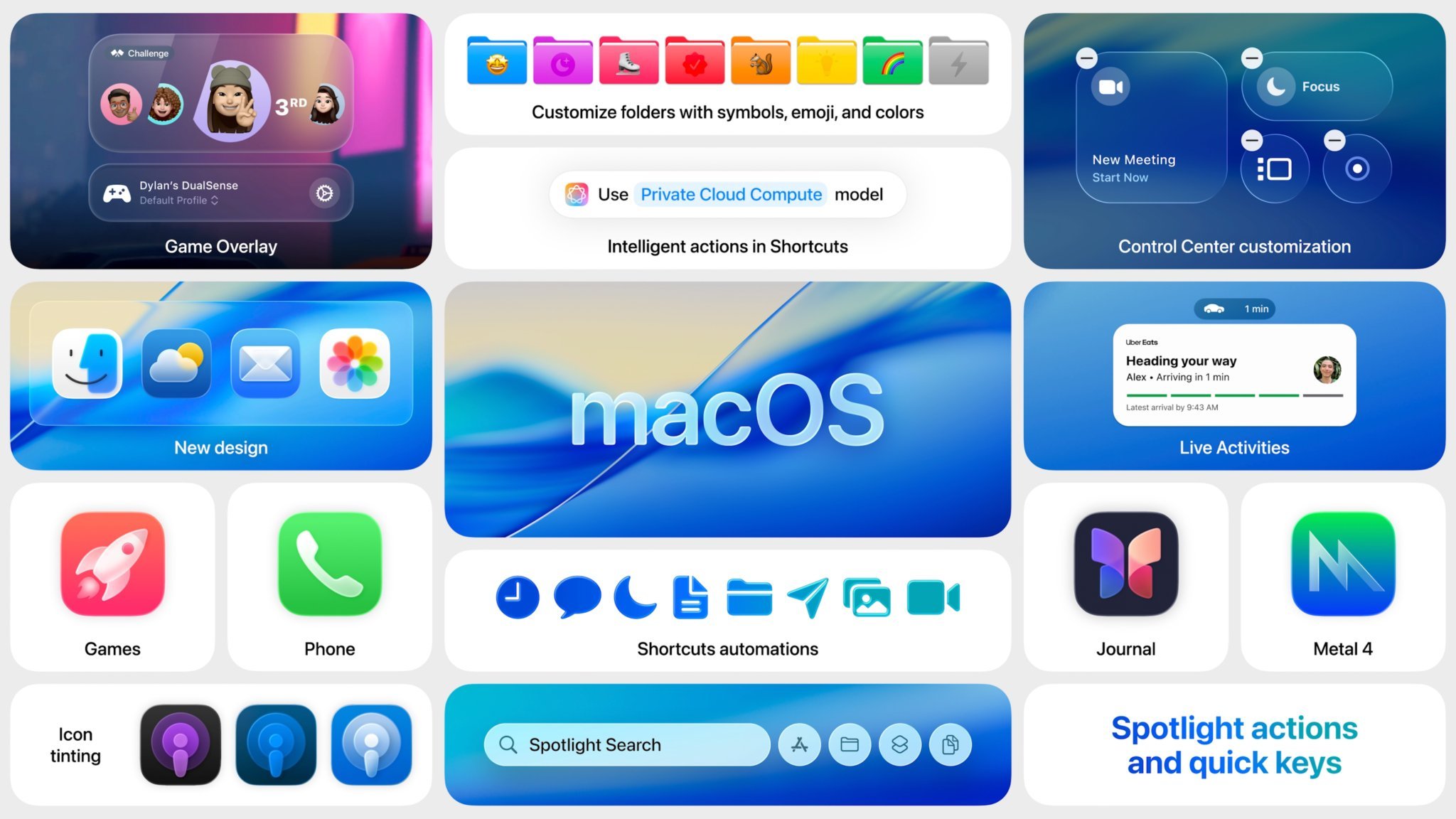
macOS Tahoe delivers a design refresh and productivity enhancements, making the Mac experience even more seamless and efficient.
Design Refresh with Liquid Glass: The design elevates the iconic elements of macOS, making them at once fresh and timelessly Mac.
Enhanced Gaming Features: The new Games app brings together all the games on Mac, and Metal 4 introduces next-generation rendering technologies to games.
Continuity Improvements: Live Activities come to Mac, and the Phone app is enhanced with features like Hold Assist, Call Screening, and Live Translation.
New Productivity Tools: Shortcuts are enhanced with intelligent actions, and Spotlight receives its biggest update ever, becoming the fastest way to browse content on Mac.
iOS 26
iOS 26 introduces a range of enhancements, from visual redesigns to intelligent features.
Lock Screen and Home Screen Redesign: The Lock Screen has been updated with the time and controls now made of Liquid Glass, and swiping up to your Home Screen is even more delightful with this beautiful glass edge and a new sense of responsiveness.
Camera and Photos App Updates: The Camera app gets a new, more intuitive design, while the Photos app takes advantage of the gorgeous new design.
Visual Intelligence Improvements: Visual Intelligence is extended to the iPhone screen, allowing users to search and take action across apps using anything they're viewing.
Communication Enhancements: Messages receives updates with polls and enhanced group chats, and FaceTime is reimagined with a new landing page and personalized Contact Posters.
watchOS 26
Apple Intelligence: The Next Generation
Apple Intelligence represents a significant leap forward in how Apple integrates AI into its ecosystem. This suite of generative AI features is designed to be deeply embedded across iPhone, iPad, and Mac platforms, enhancing user experience through personalization and intuitive functionality.
Current State and Expansion
Apple Intelligence builds upon existing features like Writing Tools, Genmoji, and Visual Intelligence to offer a more comprehensive AI experience.
Review of Existing Features: These include natural language writing assistance (proofreading, rewriting), automated summarization for notifications, messages, and emails, and visual intelligence for recognizing context in images and screenshots.
New Language Support: Apple is expanding language support to make AI-driven features accessible to a broader global audience.
Privacy Focus: Apple emphasizes user privacy through Private Cloud Compute, ensuring data remains secure and accessible only to the user.
Ecosystem Integration: Apple Intelligence is designed to seamlessly integrate across the Apple ecosystem, providing a consistent and intuitive experience across all devices.
Vision Pro Updates
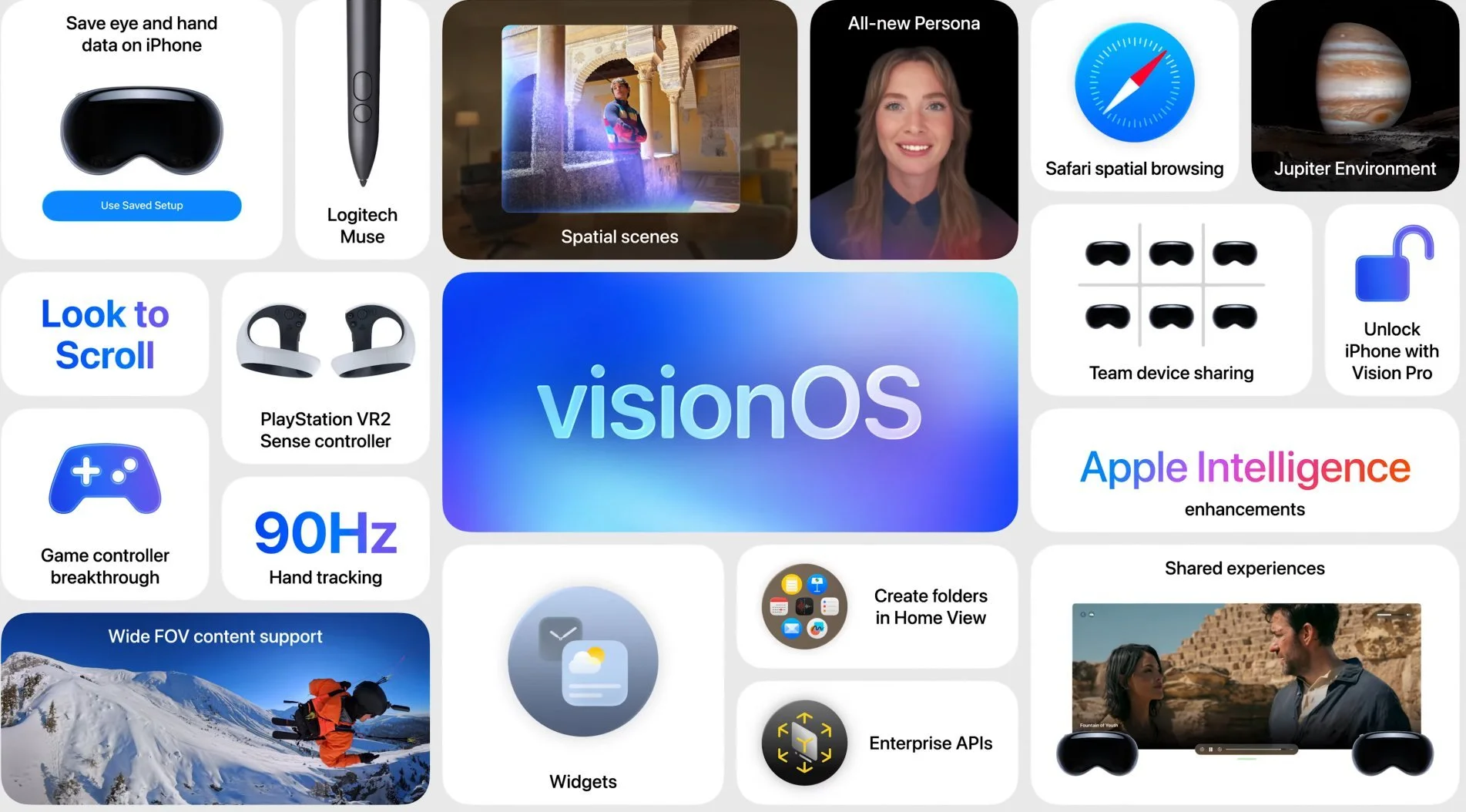
Vision Pro receives significant updates, enhancing its spatial computing capabilities and enterprise features.
Spatial Computing Advancements: New widgets integrate seamlessly into the user's space, and spatial scenes make memories feel even more realistic.
Enterprise Features: Organizations can easily share a common pool of devices among team members, and a new Protected Content API ensures that only people who've been granted access can see confidential materials.
New Accessories Support: Support for spatial accessories enables input in six degrees of freedom, unlocking entirely new creative workflows.
Content Creation Capabilities: The new Adobe app for visionOS, powered by Premiere, lets users edit and preview spatial video directly in Vision Pro.
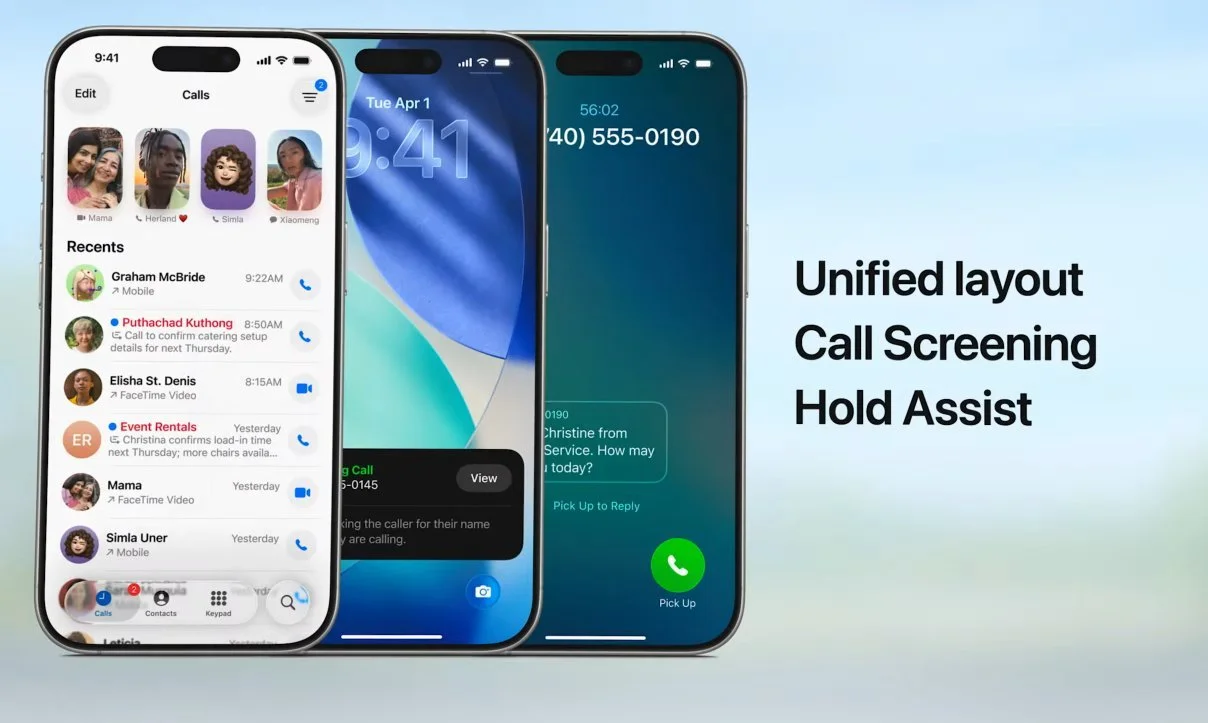
The Phone App got some fantastic features…
iPadOS 26
iPadOS 26 focuses on enhancing multitasking and productivity, making the iPad an even more versatile device.
Revolutionary Windowing System: A new windowing system gives users more control over how apps are organized and switched between.
New Multitasking Capabilities: Split View and floating windows now support smoother arrangement and resizing, making the iPad's interface feel much closer to macOS.
Preview App Introduction: The Preview app from macOS comes to iPadOS, offering powerful tools to view and edit PDFs.
Audio/Video Workflow Improvements: Content creators gain better control over audio input and can capture high-quality content with improved tonal balance and timbre.
Developer Access
Apple is opening up access to Apple Intelligence for developers, enabling them to create innovative and intelligent applications.
Foundation Models Framework: This framework allows developers to tap directly into the on-device large language model at the core of Apple Intelligence.
On-Device Capabilities: Developers can leverage on-device models for powerful, fast, and privacy-centric AI experiences.
Offline Functionality: The framework supports offline functionality, allowing apps to provide intelligent features even without an internet connection.
Real-World Applications: Examples include Kahoot! creating personalized quizzes from notes and AllTrails suggesting the best hiking options based on user preferences.
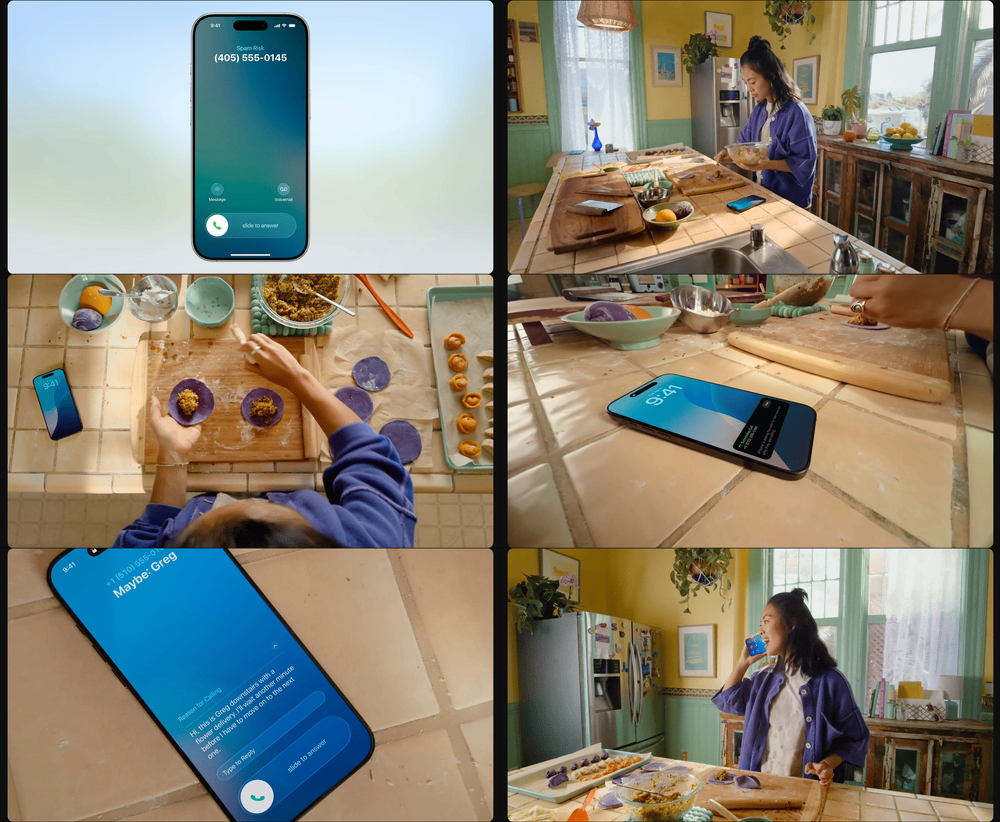
Finally, I see myself uninstalling Trucaller thanks to this nifty feature. yay 🥳